



Skip to product information
1 of 1

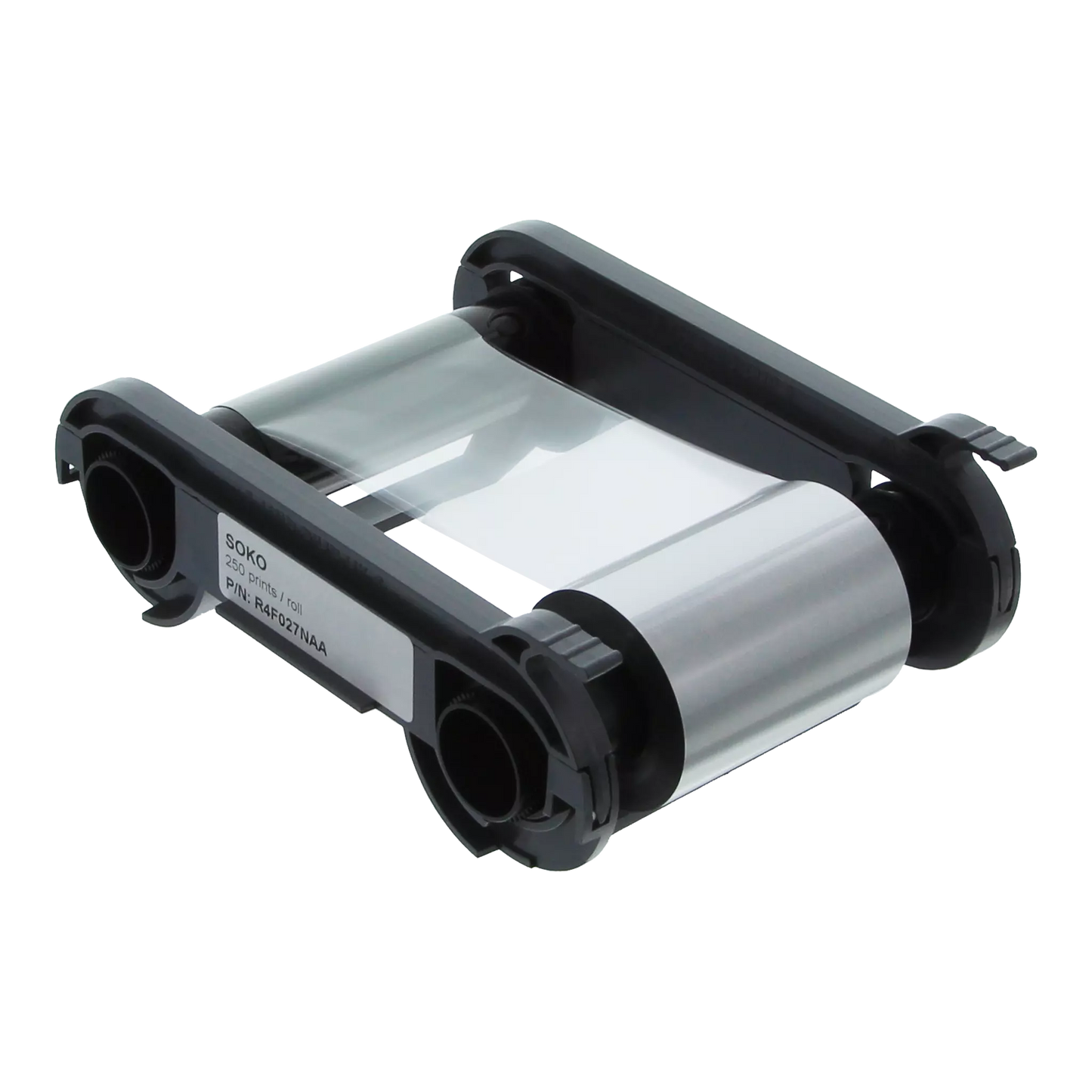
Evolis R4F027NAA SO-KO Silver and Black Ribbon - 250 Prints

Evolis R4F027NAA SO-KO Silver and Black Ribbon - 250 Prints

IN STOCK
$1.12 USD estimated total $1.12 USD
(-Infinity%)
Earn 0 badge bucks
Current Discount: 0% Next: -

Currently, we have 0 available. Please contact us to inquire about lead times. Sorry, this item is currently out of stock, please contact us to confirm lead times and availability. You can click here to discover additional alternative recommendations.

Features

  • Part number: R4F027NAA
  • Dual-Sided Silver & Black Printing — Prints silver text or graphics with overlay on the front, and black text/barcodes with overlay on the back
  • One-Pass Production — Dual-sided printing in a single pass saves time and simplifies card production
  • Built for Financial Cards — Ideal for bank cards, VIP cards, membership cards, student IDs, and corporate badges
  • Primacy & Elypso Duplex Compatible — Works with Evolis Primacy Duplex and Elypso Duplex printers only
View full details

Description

🏦 DUAL-SIDED FINANCIAL CARD RIBBON

Evolis R4F027NAA SO-KO Silver & Black Ribbon

The go-to ribbon for bank cards and premium loyalty cards. This dual-sided ribbon prints silver on the front and black on the back—with protective overlay on both sides. It's the only ribbon on the market that personalizes dark-colored pre-printed payment cards while meeting international financial card network requirements. Perfect for banks, credit unions, and high-end membership programs.

Get 250 dual-sided prints per ribbon with professional-grade matte silver and black resin. The protective overlay on both sides meets standard financial institution requirements—so your cards are suitable for bank card use and look premium. Drop it in your Primacy or Elypso duplex printer and start printing bank-quality cards immediately.

Why You'll Love This Ribbon

  • Built for financial cards — The only ribbon that personalizes pre-printed dark payment cards AND provides dual-sided overlay protection in conformity with international card network requirements.
  • Silver front, black back — Print card numbers and expiration dates in silver on the front. Signature panels and barcodes in black on the back. One ribbon does both.
  • Double overlay protection — Protective varnish on both sides meets standard financial institution requirements. Keeps your cards durable through daily swipes, taps, and handling.
  • Made for dark cards — The matte silver pops on dark backgrounds like black, navy, and deep colors. Your pre-printed card designs stay sharp.
  • Looks genuinely premium — That matte silver finish gives your cards the high-end look customers expect from banks and exclusive membership programs.
  • Keeps your printer warranty safe — Genuine Evolis High Trust® ribbon means your warranty stays intact. Pair with our cleaning kits for optimal performance.

Works With These Evolis Printers

  • Evolis Primacy Duplex — The workhorse for medium to high volume card programs. Prints up to 140 dual-sided color cards per hour.
  • Evolis Elypso Duplex — Compact duplex printing with the same professional output. Great when counter space is tight.
  • Duplex printers only — This SO-KO ribbon requires dual-sided printing capability. It won't work with single-sided Primacy or Elypso models.
  • Setup takes seconds — Drop the ribbon cassette in. The RFID chip tells your printer exactly what to do. That's it.
  • Important compatibility note — This ribbon is NOT compatible with Primacy 2 printers (which use different part numbers) or retransfer printers like the Avansia.

How SO-KO Dual-Sided Printing Works

1. Start With Pre-Printed Cards Use your dark-colored pre-printed cards with your design, logo, and chip already in place.
2. Load The Ribbon Drop in the cassette. The RFID chip configures your printer automatically.
3. Front Side Prints Silver resin prints your card number, expiration date, and cardholder name. Overlay seals it.
4. Card Flips Your duplex printer automatically flips the card for back-side printing.
5. Back Side Prints Black resin prints signature panels, CVV areas, and barcodes. Second overlay seals the back.
6. Card Ejects Ready Both sides protected. Meets financial card durability standards. Ready to issue.

Specifications

Part Number: R4F027NAA
Print Yield: 250 dual-sided cards
Ribbon Type: SO-KO (Silver-Overlay / Black-Overlay)
Front Panel: Matte silver resin + overlay
Back Panel: Black resin + overlay
Technology: RFID automatic recognition
Print Method: Resin thermal transfer
Compatible Printers: Primacy Duplex, Elypso Duplex
Card Compatibility: PVC, Composite, PET
Best For: Dark-colored cards (black, navy, etc.)
Storage (Unopened): Up to 1 year (5-25°C / 41-77°F)
Storage Conditions: Cool, dry, dark place away from dust and chemicals
Certification: Evolis High Trust® genuine

Perfect For These Cards

  • Bank & Payment Cards — Personalize pre-printed debit and credit cards with cardholder names, card numbers, and expiration dates. Protective varnish meets standard financial institution requirements.
  • Credit Union Cards — Issue member cards in-branch with instant personalization. Same professional quality as major banks.
  • Premium Membership Cards — VIP cards, executive club memberships, and premium loyalty tiers that need to look and feel high-end.
  • Corporate Cards — Company credit cards and expense cards with employee names and card details printed on dark branded backgrounds.
  • High-Security ID Cards — Government and enterprise IDs that require dual-sided overlay protection for durability and tamper resistance.
  • Gift Cards — Premium gift card programs where the card itself needs to feel valuable and withstand wallet wear.

Common Questions

What does SO-KO mean and how is it different from other ribbons?
SO-KO stands for Silver-Overlay / Black-Overlay. It's a dual-sided ribbon with four panels: matte silver resin (S) plus protective overlay (O) for the front of your card, and black resin (K) plus protective overlay (O) for the back. This is totally different from standard monochrome ribbons that only print one color with no overlay protection. The SO-KO gives you professional dual-sided printing with the durability coating that financial cards require.
Is Specialist ID an authorized Evolis dealer?
Yes. Specialist ID is an authorized dealer for Evolis ID card printers and consumables in the United States, providing genuine Evolis High Trust ribbons with full manufacturer support and warranty protection. All ribbons are properly stored and guaranteed fresh for optimal print quality.
Why does this ribbon only work with duplex printers?
The SO-KO ribbon is specifically designed for dual-sided printing—silver on front, black on back. Single-sided printers can't flip the card to print the second side. You need a Primacy Duplex or Elypso Duplex printer that has the flip mechanism built in. If you have a single-sided printer, check out our standard monochrome ribbons instead.
Will this work with my Primacy 2 printer?
No. The R4F027NAA is compatible with the original Evolis Primacy Duplex and Elypso Duplex printers only. Primacy 2 printers use different ribbon part numbers. If you have a Primacy 2, contact us and we'll help you find the right ribbon for your printer.
What makes this ribbon suitable for bank cards?
Two things: the protective overlay on both sides and the ability to print on dark pre-printed cards. The protective varnish applied to each side of the card meets standard financial institution requirements and is suitable for bank cards. The R4F027NAA is the only consumable on the market that lets you personalize pre-printed payment cards with dark backgrounds while providing dual-sided overlay protection in conformity with international card network requirements. That's why banks and credit unions use it.
Can I use this ribbon on white or light-colored cards?
Technically yes, but it's designed for dark cards. The matte silver shows up best on black, navy blue, and other dark backgrounds. On white cards, silver text can be hard to read. If you're printing on light-colored cards, a standard black monochrome ribbon with overlay would give you better contrast and readability.
How many cards can I print with one ribbon?
Each R4F027NAA ribbon prints 250 dual-sided cards. That means 250 cards with silver printing and overlay on the front, plus black printing and overlay on the back. The RFID chip tracks remaining capacity and alerts you when it's time to replace the ribbon.
What is RFID ribbon recognition?
Every Evolis High Trust ribbon has an embedded RFID chip. When you load the ribbon, your printer automatically detects it's an SO-KO ribbon and configures the optimal print settings. No manual setup required. The chip also tracks how much ribbon is left and displays it in Evolis Print Manager software, so you always know when to reorder.
How should I store unused ribbons?
Store unopened ribbons in a cool, dry, dark place at 5-25°C (41-77°F). Keep them away from direct sunlight, dust, heat sources, and chemicals. Unopened ribbons are good for up to one year when stored properly. Once you open a ribbon, use it promptly for best print quality. Ribbons stored improperly may produce poor-quality prints and can increase printhead wear.
Do I need to clean my printer when changing ribbons?
Evolis recommends cleaning your printer after each ribbon change for optimal print quality. Use genuine Evolis cleaning cards and kits—they're designed specifically for your printer and help maintain your printhead warranty. Check out our Evolis cleaning kits to keep your printer running smoothly.
🏦

Questions about financial card printing or Evolis ribbons?

Our Evolis specialists can help you select the right ribbon for your bank card program, configure your duplex printer settings, and ensure you're meeting financial card network requirements.
Call 1-800-380-6726 or Contact us for expert assistance.

×
Fill out my online form.

Reviews