





















Skip to product information
1 of 2

Wi-Fi Upgrade Kit for Sigma ID Card Printers - 529805-001

Wi-Fi Upgrade Kit for Sigma ID Card Printers - 529805-001

IN STOCK
 
$318.00 each
Quantity
 
Total Price: $0.00
Get a Quote

Complex Project? Click Here

Product Specifications

  • Part number:
  • Wireless Connectivity: Adds Wi-Fi capabilities to your Sigma ID card printer for seamless wireless printing.
  • Dual-Band Support: Compatible with both 2.4GHz and 5GHz Wi-Fi bands for enhanced flexibility.
  • Secure Connection: Supports multiple authentication modes, including WPA2 Personal, to ensure secure data transmission.
  • Easy Integration: Designed for quick and easy installation, integrating smoothly with your existing printer setup.
View full details

Description

Add Wi-Fi capabilities to your Sigma ID card printer, specifically DTC models DS1, DS2, DS3, and DS4, with this upgrade kit (Part Number 529805-001). This upgrade allows your printer to connect wirelessly, providing flexible and convenient printing solutions for your organization. With support for dual-band Wi-Fi and multiple authentication modes, this kit ensures a secure and reliable connection, making it easier to manage your ID card printing needs from anywhere.

Technical Specifications:

  • Wi-Fi USB Dongle: The kit includes a USB Wi-Fi dongle designed for direct installation into the printer’s available USB port.
  • Dual Band Support: Operates on both 2.4 GHz and 5 GHz frequency bands for enhanced flexibility and network compatibility.
  • Supported Wi-Fi Standards: Wi-Fi G (up to 7 MB/s) and Wi-Fi N (up to 100 MB/s), providing sufficient bandwidth for standard printing operations.
  • Authentication Modes: The system supports None, WEP, and WPA2 security protocols for secure data transmission.
  • Connection Methods: Works with both wired and wireless network setups, including Ethernet (wired) and USB connections. The printer can switch between Wi-Fi and Ethernet connections seamlessly.

Installation Process:

  1. Power Down: Begin by pressing the power button to turn off the printer.
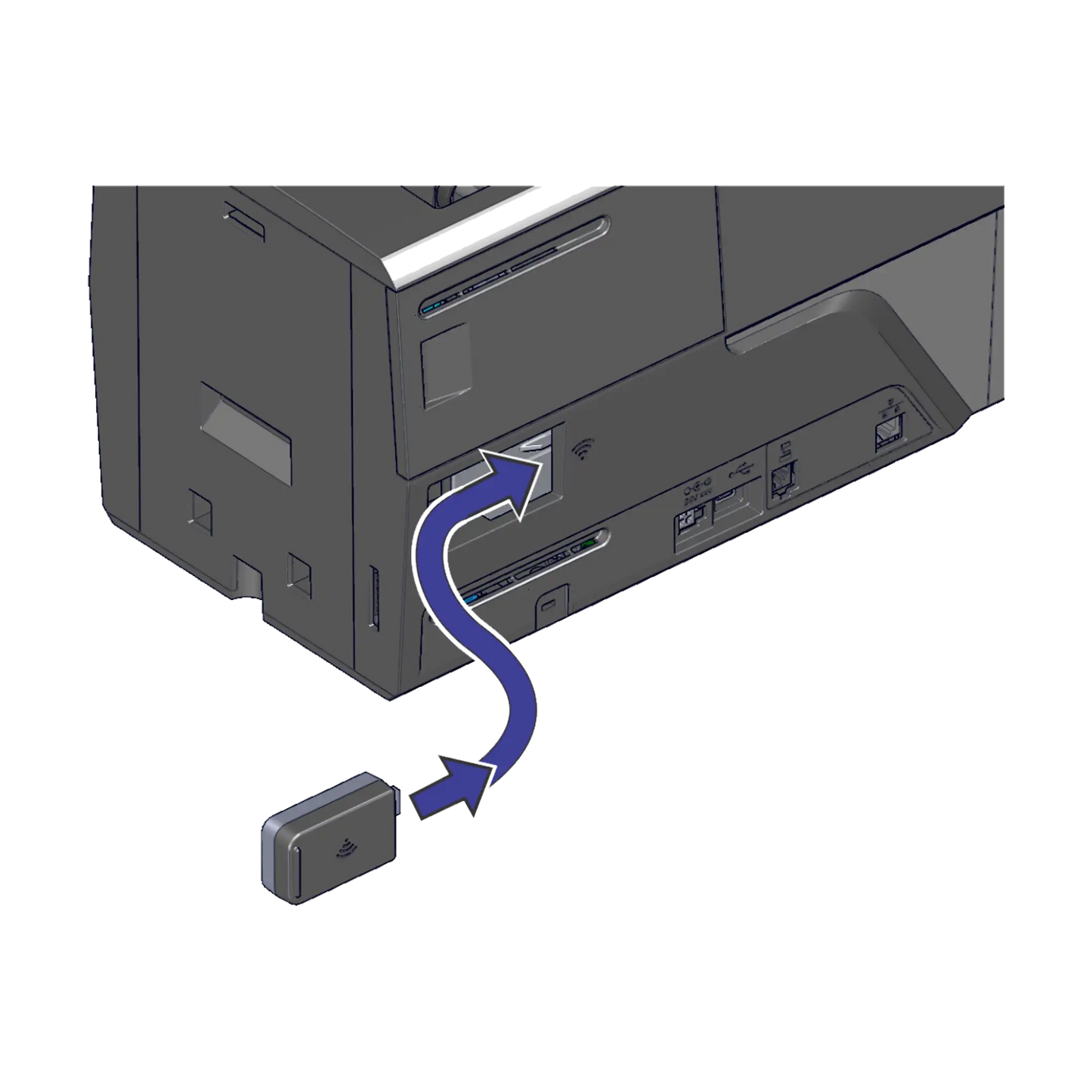
  2. Hardware Installation: Insert the Wi-Fi USB dongle into the designated port on the side of the printer until it locks into place.
  3. Power On: Turn the printer back on by pressing the power button.
  4. Network Configuration:
    • Establish a temporary wired connection to the printer using either USB or Ethernet.
    • Access the Printer Dashboard using an administrator account.
    • Navigate to the Wi-Fi configuration settings (Configuration > Settings > Wi-Fi Network Station Setup).
    • Enter the necessary network credentials:
      • SSID (network name)
      • Security mode (None, WEP, or WPA2)
      • Password for network access
    • Configure the network type (DHCP or Static IP). For Static IP setups, specify the gateway address and IP address.
  5. Finalize Wi-Fi Setup:
    • Once the network is configured, enable Wi-Fi operation in the dashboard (Configuration > Settings > Wi-Fi Modes).
    • Set the Wi-Fi mode to "Station" and define the region (e.g., US, EU) to ensure compliance with local regulations.
  6. Disconnect Wired Connection: After confirming successful connection to the wireless network, remove the Ethernet or USB cable.

Supported Regions: The Wi-Fi dongle supports use in various countries, including the US, Canada, UK, and EU nations, among others.

This upgrade offers a simple solution for integrating Entrust Sigma printers into wireless environments without the need for additional cabling, enhancing deployment flexibility in both office and industrial settings.

×